
I Zeroed Out My Entire Inventory
And then fixed it in minutes.
A Shopify CSV import mistake wiped every single inventory count across Vivre Activewear. Shopify support could not restore it. Here is what happened next, and how I accidentally ended up doing the most efficient stock take the business has ever had.
I made a rookie mistake this morning.
I exported my Shopify product CSV to edit some descriptions, made my changes, then imported it back. Clean process, right? Except Shopify decided to reset every single inventory count to zero on import.
Every product. Zero.
I called Shopify support. They could not restore it. No rollback, no backup on their end, nothing. They told me to restore from a third-party backup app. Which I did not have.
Here is the part that makes Shopify's workflow a bit weird: even if I wanted to use my original export CSV as a reference, it would not have helped. Shopify's product export does not include inventory counts. So the file I had was useful for descriptions and SKUs but completely useless for restoring stock levels. The inventory data was just gone.
Every product at zero. No backup. No rollback. Support could not help. Lesson learned the hard way.
Months of procrastinating, forced in one go.
Here is the thing. I had been meaning to do a proper stock take since October 2024, when I shifted my warehouse. Months of procrastinating on it. So in a weird way, the universe just forced my hand.
Since I had to recount everything anyway, I might as well do it properly. Which meant I needed a tool that actually worked the way I wanted to work.
The painful way. Pre-2020.
Before Vivre grew up and before I grew up as an ops person, stock takes were fully manual.
I would print out the full product list on paper. Walk around the warehouse, pen in hand. Count each item. Then go back to the computer and manually key in the numbers, doing the plus-minus against whatever the system said.
It worked. It was also miserable.
Eventually I started using barcode scanner apps. Scan the item, key in the count, repeat until done. More efficient. But most of these apps force you into blind count mode, which means you count without seeing what the system already shows. That is technically the correct way to do a stock take. It avoids anchoring bias, where you subconsciously count toward the number you expect.
Technically right. But not how I like to work. I want to see the current system count so I can sanity check as I go. None of the off-the-shelf apps let me do that the way I wanted.
So I stopped using them.
I just built what I needed.
Since Shopify support was not going to save me, I built a custom inventory scanner inside SME AI Office.
If you have not heard of SME AI Office, it is the SaaS product I co-founded for Singapore SMEs. The platform is built to power custom business tools and workflows, not just the chatbots it is known for. I spun up this scanner in minutes.
Here is how the flow works:
I scan a barcode with my phone camera. The app pulls up the product info: name, SKU, colour, size variant. It shows me the current stock count in the system. Then there is a big, clear numpad where I key in the actual physical count. I tap the tick to update, or X to skip to the next product.
That is the whole thing. No spreadsheet. No paper. No separate reconciliation step afterward.
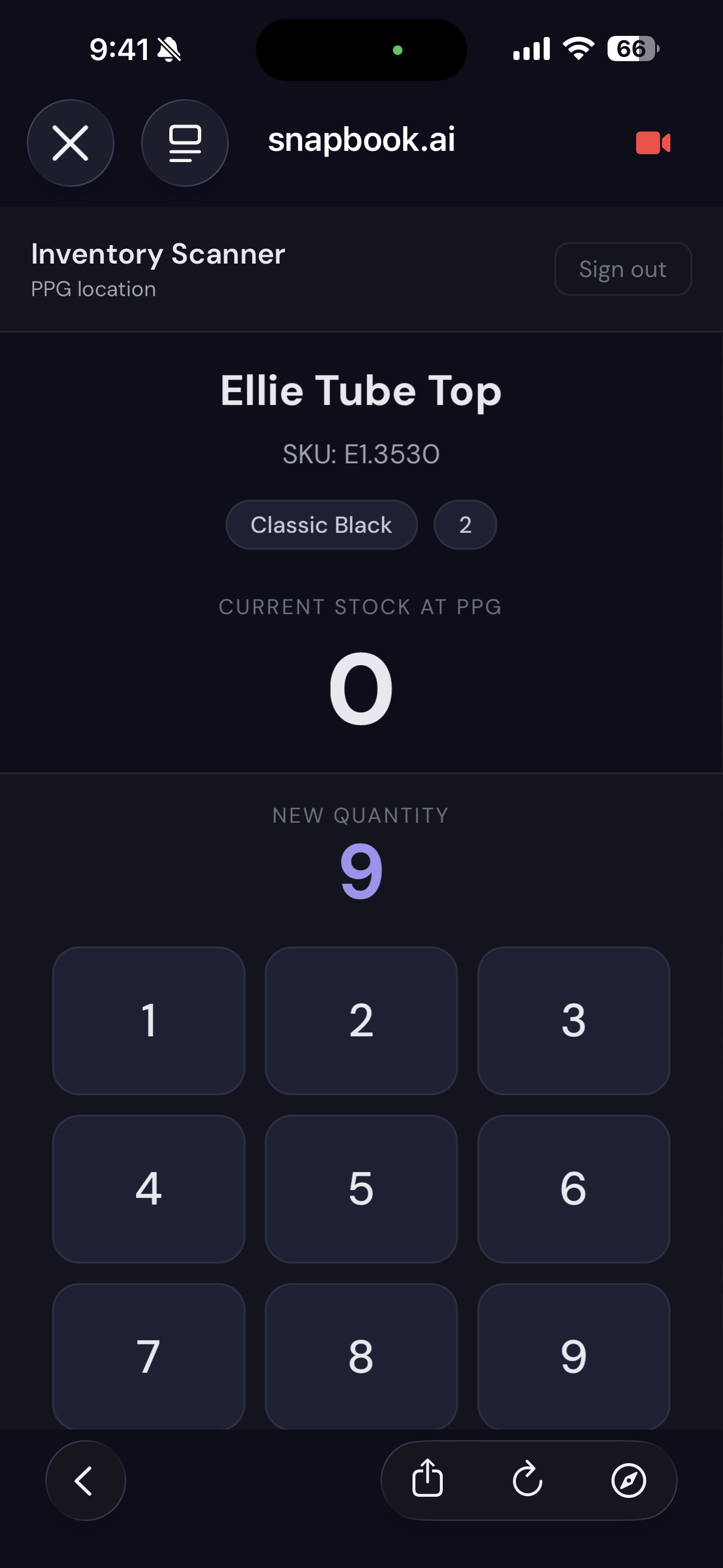
The UI is built for warehouse conditions. Big buttons, clear product info, no tiny tap targets. When you are scanning and counting fast, you do not want to be squinting at a screen trying to hit the right field.
Built exactly what I wanted, because I could. That is one of the real advantages of being a builder-operator.
The accidental win.
What started as damage control turned into the most efficient stock take Vivre has ever had.
Months of warehouse stock, unverified since the move, cleared in a single session. Every count updated live into the system. No paper trail to reconcile, no manual data entry step at the end.
If I had not made the CSV import mistake, I would probably have put off the stock take for another few months.
Sometimes you need to break something to fix it properly.
Back up before you import. Yes, I know.
The obvious lesson first: always back up before doing a CSV import in Shopify. And be aware that the product export does not include inventory, so if stock levels matter to you, you need a separate export or a third-party backup tool specifically for that.
The less obvious lesson: when something breaks and the official support channel cannot help you, the fastest path forward is usually to just build the thing you actually need. The tool does not have to be fancy. It just has to work for the way you work.
Off-the-shelf apps will always be built around the average use case. If your workflow is slightly different, you will spend more time fighting the tool than using it. Building your own is not always practical, but when you can, you end up with something that fits exactly.
Questions
Did Shopify support really not help?
Correct. Once a CSV import overwrites inventory, there is no native rollback in Shopify. They advised restoring from a third-party backup app, which I did not have. And the tricky part is that Shopify's product export CSV does not include inventory counts, so even my original export file was no use for restoring stock levels.
What is a blind count and why does it matter?
A blind count means you count physical stock without seeing what the system already shows. The idea is to avoid anchoring bias, where you subconsciously count toward the number you expect. It is considered best practice in inventory management. I personally prefer seeing the current figure so I can sanity check as I go, which is why I built my own tool instead of using off-the-shelf apps.
Is the inventory scanner available for other businesses?
Not as a standalone product right now. But SME AI Office builds custom tools and workflows for SMEs. If this kind of internal tooling is useful for your business, reach out and we can talk through what makes sense.
Kevin Chia is a Singapore-based entrepreneur and consultant. He co-built Vivre Activewear from $10k to $2M+ in annual revenue, and co-founded SME AI Office, a back-office platform for Singapore SMEs. He writes about business, systems, and tools that actually work at kevinchia.sg.